 HIXOR
Multi-factor authentication for small companies: start with admin accounts, then email, then business cloud — including reluctant staff and lost devices
Key points
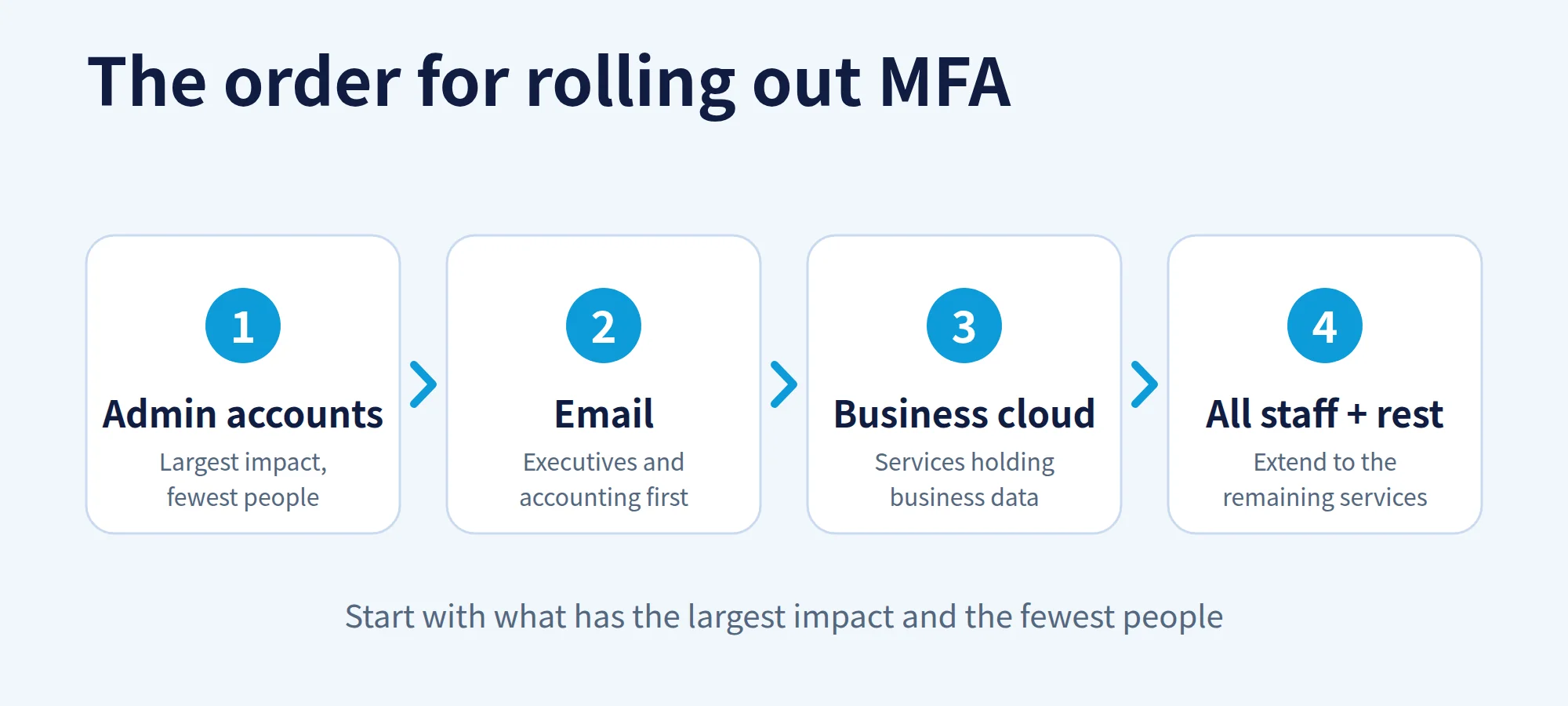
- Introduce multi-factor authentication for the company in this order: (1) administrator accounts, (2) email (executives and accounting first), (3) cloud services holding business data, (4) all staff and the rest. Starting with what has the greatest impact if taken over, and the fewest people, lets the rollout advance without strain
- The reason for protecting email: from a taken-over email account, fake requests are sent to suppliers under the genuine address (IPA)
- Before rollout, decide the inventory of accounts, the tidying of shared accounts, the handling of leavers, and the recovery procedure for when a device is lost
- For staff who resist, state the reason in one sentence, have the owner use it first, and record exceptions with deadlines. Make the recovery procedure for a lost device one that never skips identity verification
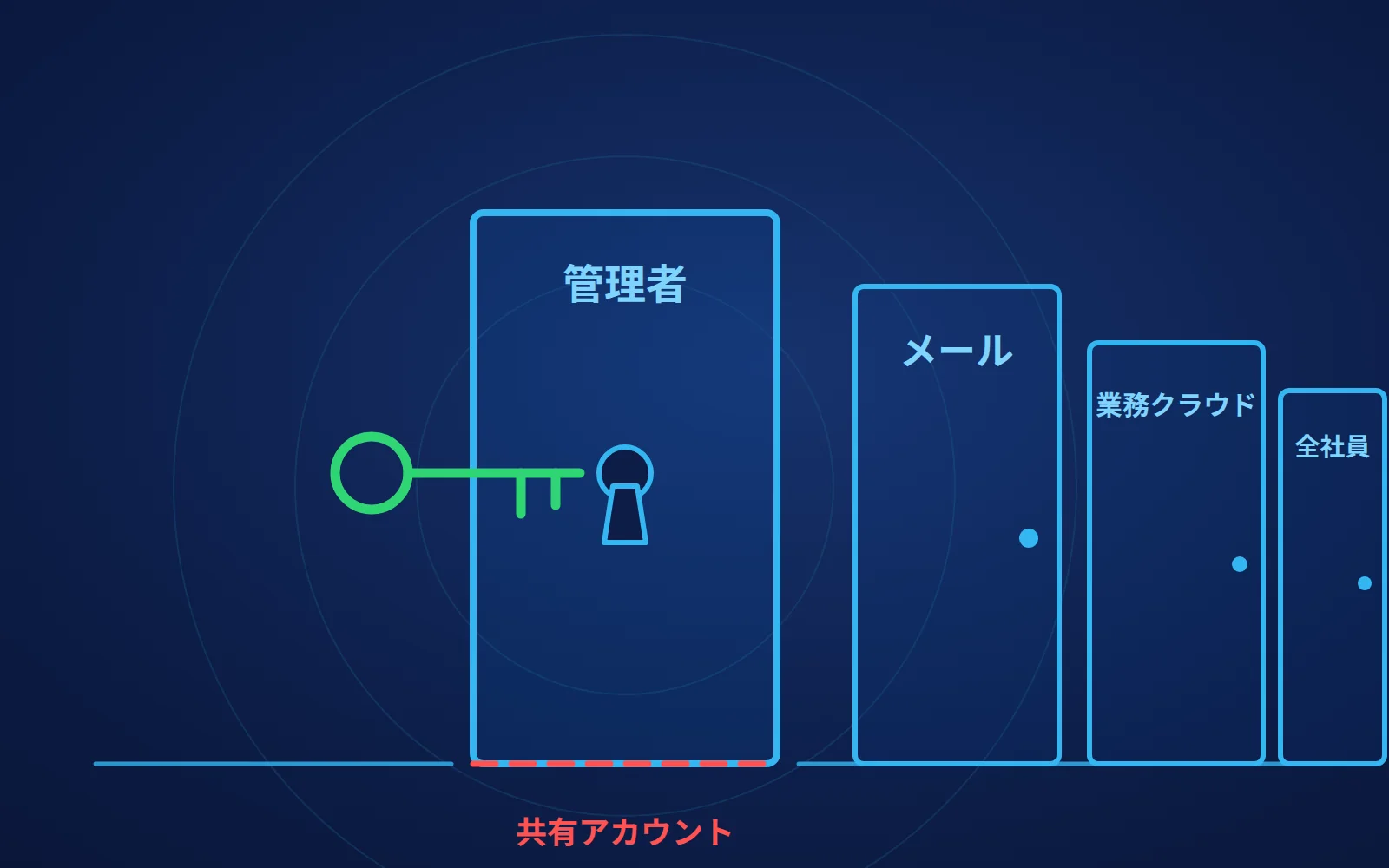
When a company introduces multi-factor authentication (MFA), do not roll it out to everyone at once. Proceed in this order: (1) administrator accounts, (2) email, (3) cloud services that hold business data, (4) all staff and the remaining services. Administrator accounts come first because the impact if one is taken over is the greatest, and there are few of them. Email comes next: it is where password resets for other services are delivered, and where correspondence with suppliers gathers. This order is not one that a public body has laid down as the single correct answer; it is HIXOR's organisation of material from IPA, the Ministry of Internal Affairs and Communications, and the National Cybersecurity Office (NCO). This article explains the reasons for the order, how to choose a method, the pitfalls specific to companies, how to deal with staff who resist, how to prepare for a lost device, and an example one-week rollout plan. How multi-factor authentication works, and settings for personal accounts, are summarised in Getting Started with Multi-Factor Authentication.
Why email comes early: when it is taken over, fake requests arrive from the genuine address
IPA explains that if the credentials for an email account are stolen, email with suppliers can be spied on, leading to business email compromise (BEC) (material dated 3 August 2026). There is also a risk that email impersonating your own company is sent to suppliers from an email account that has been logged into without authorisation.
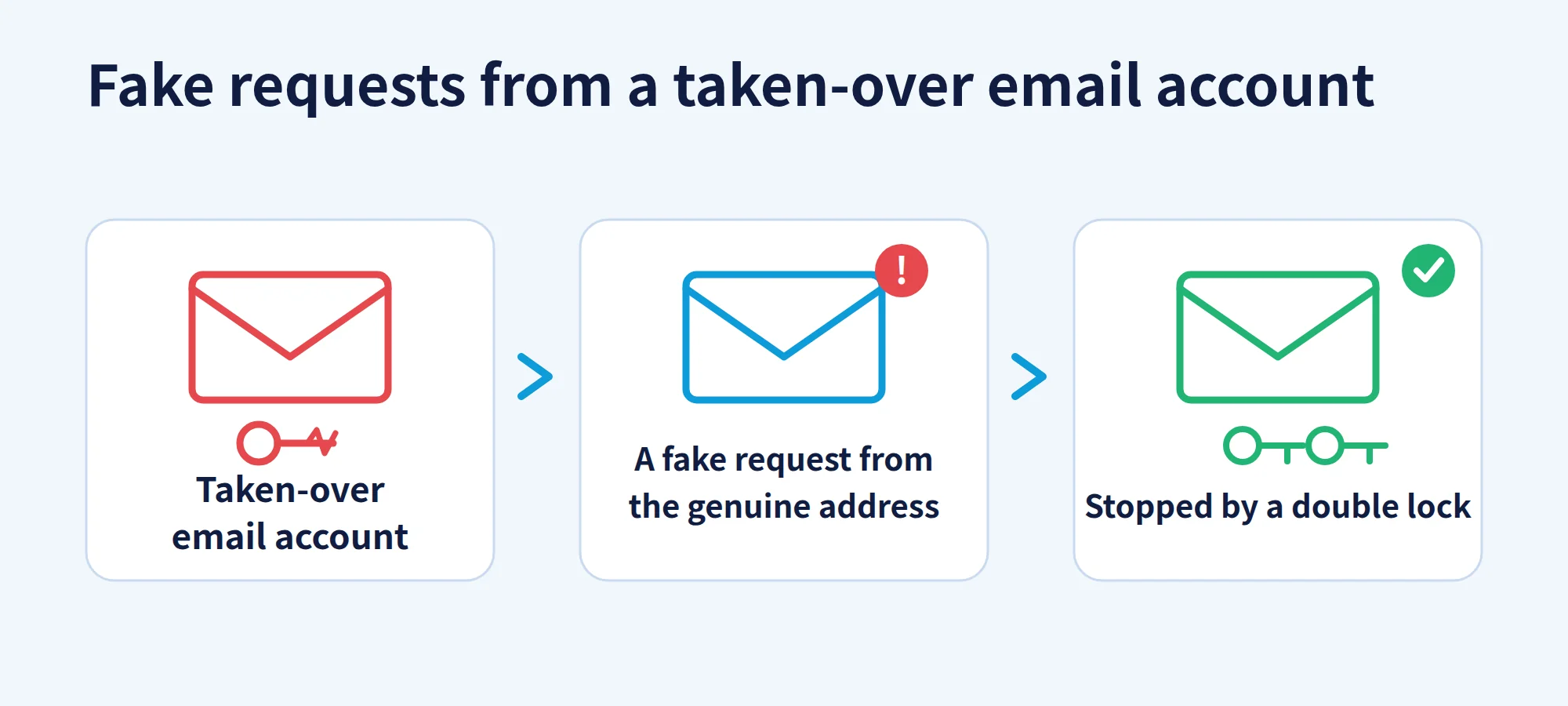
In BEC, there are cases where a supplier's account was taken over and a fake payment request arrived from the genuine address. IPA's Top 10 Information Security Threats 2026 commentary introduces, as one such loss, a case of about ¥14 million. In that situation, checking the sender's address reveals no difference. IPA also states that fake emails impersonating a president or similar may be sent from the genuine account, using a takeover of the email account of the person being impersonated.
In other words, multi-factor authentication for email is not only protection for your own company's information; it is also readiness against fake requests being sent from your company's address to suppliers and inside the company. How the receiving side checks such requests is covered in a separate article.
The risk that leaked credentials will be used is real. The Council of Anti-Phishing Japan (secretariat: JPCERT/CC), after leaks of email addresses and passwords at several ISPs were published in May to June 2026, called on the people affected to consider setting up multi-factor authentication in addition to changing their passwords (report, August 2026).
Before you start: take stock of the accounts you use
The first task is not configuration but inventory. Write down the email, cloud services, admin consoles and VPNs the company uses, and list who holds which permissions. IPA's SME Information Security Guidelines, 4th edition (published 27 March 2026), ask companies to define procedures for issuing, changing and deleting user IDs and administrator IDs, and to keep assignments to the minimum necessary. In an alert dated 9 October 2026 (aimed mainly at businesses handling large volumes of personal information), IPA also called for listing every external service in use and checking accounts for anything abnormal. The thinking on checks is the same for a small company.
Include the following items in the list.
- The service name, and the people (departments) who use it
- The accounts holding administrator privileges, and their owners
- Whether any accounts are shared
- Whether multi-factor authentication is supported, and whether it is set up now
- Whether accounts of people who left or transferred remain
For services that do not support it, record that in the list and think about other countermeasures later.
The order of rollout: administrators, then email, then business cloud, then all staff
1. Start with administrator accounts
Administrator accounts can add users and change permissions. The impact if one is taken over is the greatest, and there are few of them, so make them the first target. If the people in charge get used to using it first, they can also answer when staff ask questions later.
At the same time, review how administrators are used. The Ministry of Internal Affairs and Communications' Telework Security Handbook (Checklist) for SME staff lists, as check items, giving administrator privileges only to the minimum number of people who need them for work, and using administrator privileges only when doing work that requires them. Separate the account used for everyday work from the account used for administration.
2. Email: starting with executives and accounting
Next is email. IPA's "Attack email patterns targeting companies and organisations, and their countermeasures" recommends setting a rule that makes multi-factor authentication mandatory for services that can be accessed directly from the internet (such as SaaS and email).
If changing everyone's email at once is difficult, start with the executives and with people involved in payments, such as accounting and general affairs. IPA states that fake emails impersonating a president or similar may be sent using a takeover of the email account of the person being impersonated, and that departments managing money, such as accounting, tend to be targeted. This "executives and accounting first" order is HIXOR's proposal, based on those points.
3. Cloud services that hold business data
Cover the cloud services that hold business data — customer information, accounting, file sharing, chat — starting with the most important. Raise the priority of anything that can be used from outside the company. Entry points from outside into the company, such as VPNs, are among the targets for which IPA's guidelines ask for strengthened authentication, in particular multi-factor authentication. The relationship between VPNs and ransomware is summarised in Ransomware readiness: the first five things to do.
4. All staff, and the remaining services
Finally, extend it to all staff and the other services. The ministry's handbook lists, as a check item, setting systems used for telework so that multi-factor authentication is required for access. For services that do not support multi-factor authentication, the administrator judges whether to think of another means as the countermeasure, or to continue using the service.
Choosing a method: if you can choose a passkey or an authenticator app, avoid SMS
If the company decides a policy for how the second factor is received, staff will not hesitate.
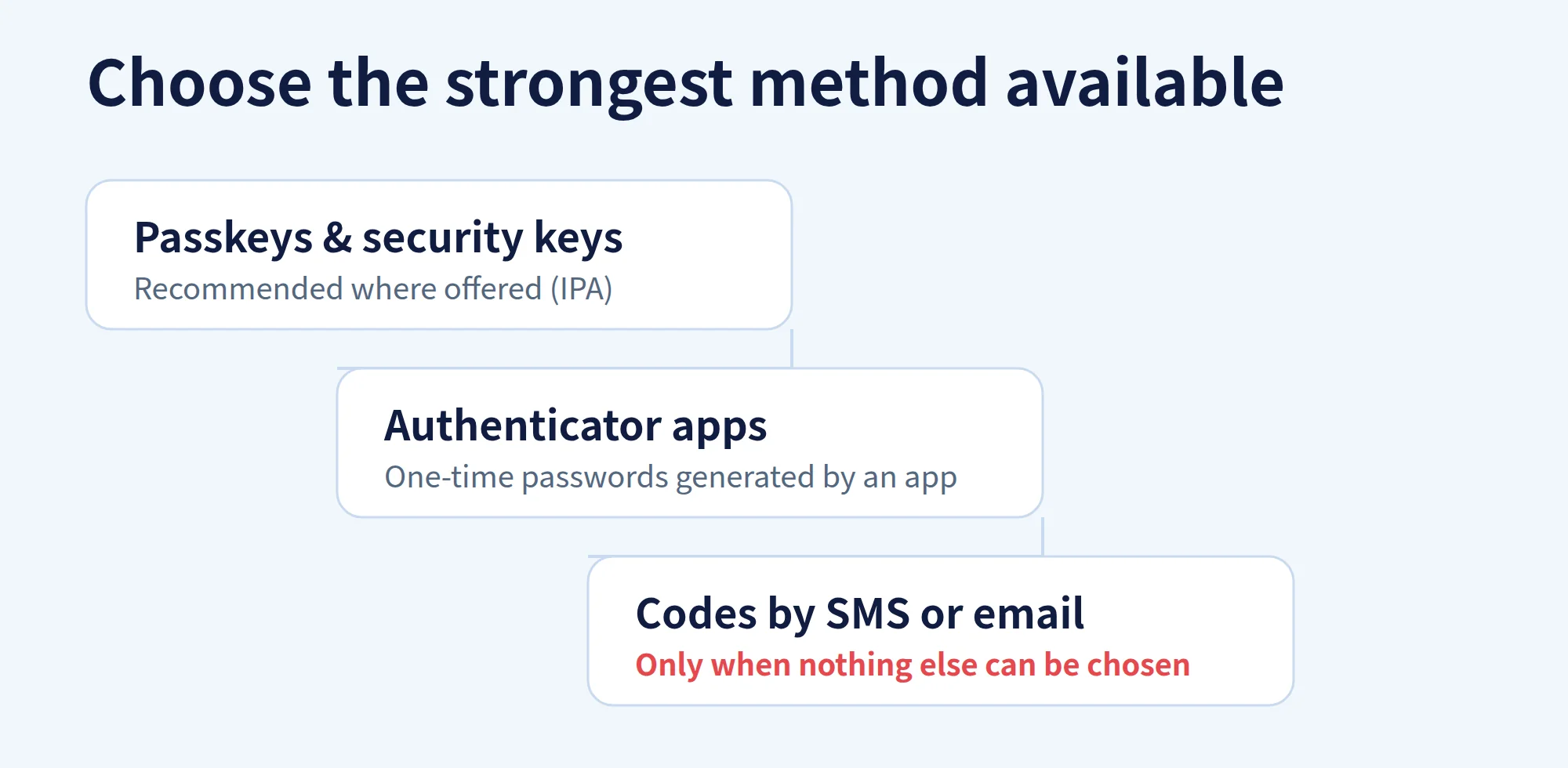
- Passkeys and security keys: IPA's Top 10 Threats 2026 commentary recommends using them where they are offered. The National Police Agency also calls for the use of "passkeys and other multi-factor authentication" (Cyber Police Bureau newsletter, October 2026). According to the Council of Anti-Phishing Japan's guideline, a passkey stores the credential inside the device, tied to the genuine domain, so it is not sent to a fake site.
- Authenticator apps: a method using one-time passwords generated by an app on a smartphone. IPA's commentary also gives it as an example.
- Codes delivered by SMS or email: the NCO's Internet Safety Handbook (excerpt for small organisations) describes methods using email or SMS as "not recommended on safety grounds". On the other hand, IPA's commentary lists SMS as an example of a possession factor. Decide that where another method can be chosen, you will not use it, and there will be no hesitation. This is HIXOR's organisation. Whether to keep using a service where only SMS can be chosen is for the administrator to judge.
Multi-factor authentication also has limits. IPA explains "real-time phishing", in which an attacker uses, on the spot, the ID, password and one-time password entered on a fake site to log in without authorisation, attempting to break through multi-factor authentication by SMS or authenticator app, and techniques that steal the mark of an authenticated session (the session cookie) after login. The NCO handbook also warns that if an unfamiliar push notification arrives on a smartphone, you must not respond to it. So share the following two points inside the company.
- Do not approve, and do not enter, a notification or confirmation code you do not remember approving; report it to the administrator
- Do not open a sign-in screen from a link in an email or message (open it from the official bookmark)
How it works, and settings for personal accounts, are in Getting Started with Multi-Factor Authentication.
Proceeding in the admin console: the setting that makes it mandatory for everyone, and a grace period
According to the Ministry of Internal Affairs and Communications' settings guides (March 2025 editions), in the admin console of groupware there are services where, for multi-factor authentication (two-step verification), you can choose to leave it optional for users, to "enforce it now", or to "enforce it from a specified date". Giving a grace period secures time for staff to finish setting up. Settings screens differ by service and are updated, so this article does not carry operating steps. Check your service's official help and the ministry's settings guides.
An example of how to proceed (HIXOR's proposal):
- The systems staff or administrators use it first
- Departments that are easy to cooperate with, such as accounting and general affairs, use it next, and the points where they stumbled are reflected in the procedure document
- Roll it out to the whole company, with a deadline set
Pitfalls specific to companies: shared accounts, the number of administrators, leavers, lockout
Shared accounts. IPA's guidelines ask companies to avoid shared IDs as far as possible, and where they must be used, to put in place a mechanism that can identify who used them. If multi-factor authentication is put on a shared account, the authentication device becomes one person's property, and when that person is absent, nobody can sign in (HIXOR's note). First, list the shared accounts and review whether sharing is really necessary. The handling of shared accounts is also informed by the article on leavers.
The number of administrators. Keep administrators to the minimum necessary (IPA, Ministry of Internal Affairs and Communications). If there is only one administrator, and that person loses their device, the company can no longer enter its own admin console.
Leavers. IPA's guidelines ask for rules that prevent omissions in changing and deleting privileges when people transfer or leave, and for collecting information, equipment, IDs and keys when someone leaves. The registration of the device used for multi-factor authentication is also among the things to remove when someone leaves. The procedure is summarised in Former employees' accounts: what to stop, when, and in what order.
Administrator lockout. If every administrator becomes unable to sign in, the company itself can no longer operate its own admin console. Microsoft's official documentation recommends, in preparation for this situation, creating two or more emergency access administrator accounts within the organisation. Use them only when the usual administrator accounts cannot be used, confirm at least every 90 days that they still work, and set an alert to fire each time they are used. For other services too, before rollout, check in each service's official help whether a recovery means is provided for when administrators are locked out.
Dealing with staff who resist multi-factor authentication
The reason rollouts stall is more often people's resistance than the technology. The Council of Anti-Phishing Japan's guideline also notes that while multi-factor authentication is effective against unauthorised logins through phishing, it does impair user convenience, and touches on the possibility that the burden differs with users' IT knowledge and the devices they use. So treat resistant voices as opinions worth hearing. The following are common objections and example answers. These are HIXOR's proposals, not the wording of any public body.
| Common objection | Example answer |
|---|---|
| "It's a hassle every time" | Acknowledge the hassle, and state the purpose in one sentence: "To stop fake invoices being sent to our suppliers." Some services have a setting that skips confirmation on a trusted device (the ministry's settings guides). The scope of skipping is for the administrator to decide |
| "I don't want to use my own phone for work" | Do not force it; consider whether options can be prepared (a device the company provides, a security key, and similar). Whether personal devices are used, or the company provides them, is a question of cost and policy, so the owner decides |
| "Our company won't be targeted" | According to IPA, BEC attacks may begin with spying on email with suppliers. A company that exchanges email can be a target regardless of its size (the latter half is HIXOR's view) |
| "What happens if I can't sign in?" | Show the recovery procedure before rollout (the next section). If the "contact point when in trouble" is decided, anxiety falls |
In how you proceed, keep the following points.
- The owner uses it first. If the president and executives set it up first, fewer voices ask for "exceptions".
- Exceptions are recorded with a reason, a deadline and an approver. If exceptions are granted widely, the system becomes a formality only. When the deadline comes, review it.
- Decide one contact point for trouble. Write the contact for when someone has trouble with setup or signing in into the rollout notice.
- Make it easy to report. Create an atmosphere where a notification nobody remembers approving can be reported at once.
If a device is lost: decide the recovery procedure before rollout
With multi-factor authentication, if you lose the device used for confirmation, you yourself can no longer sign in. At the same time, the recovery procedure is also a part that attackers target. The Council of Anti-Phishing Japan's guideline states that the alternative means for when a password is forgotten or a device is lost need to be designed carefully so that attackers cannot abuse them. After signing in with stolen information, an attacker may also try to change the multi-factor authentication settings so that they can enter at any time.
Things to decide in advance (including HIXOR's proposals)
- Have each person register two or more authentication methods (so that even if one device becomes unusable, they can still get in)
- For services with backup codes, generate them at setup time, print them, and store them in a place that can be locked (Google Workspace's official help explains that backup codes can be generated and printed in advance)
- Decide one contact point (window) for when a device is lost
- When changing devices, confirm the new device works before parting with the old one
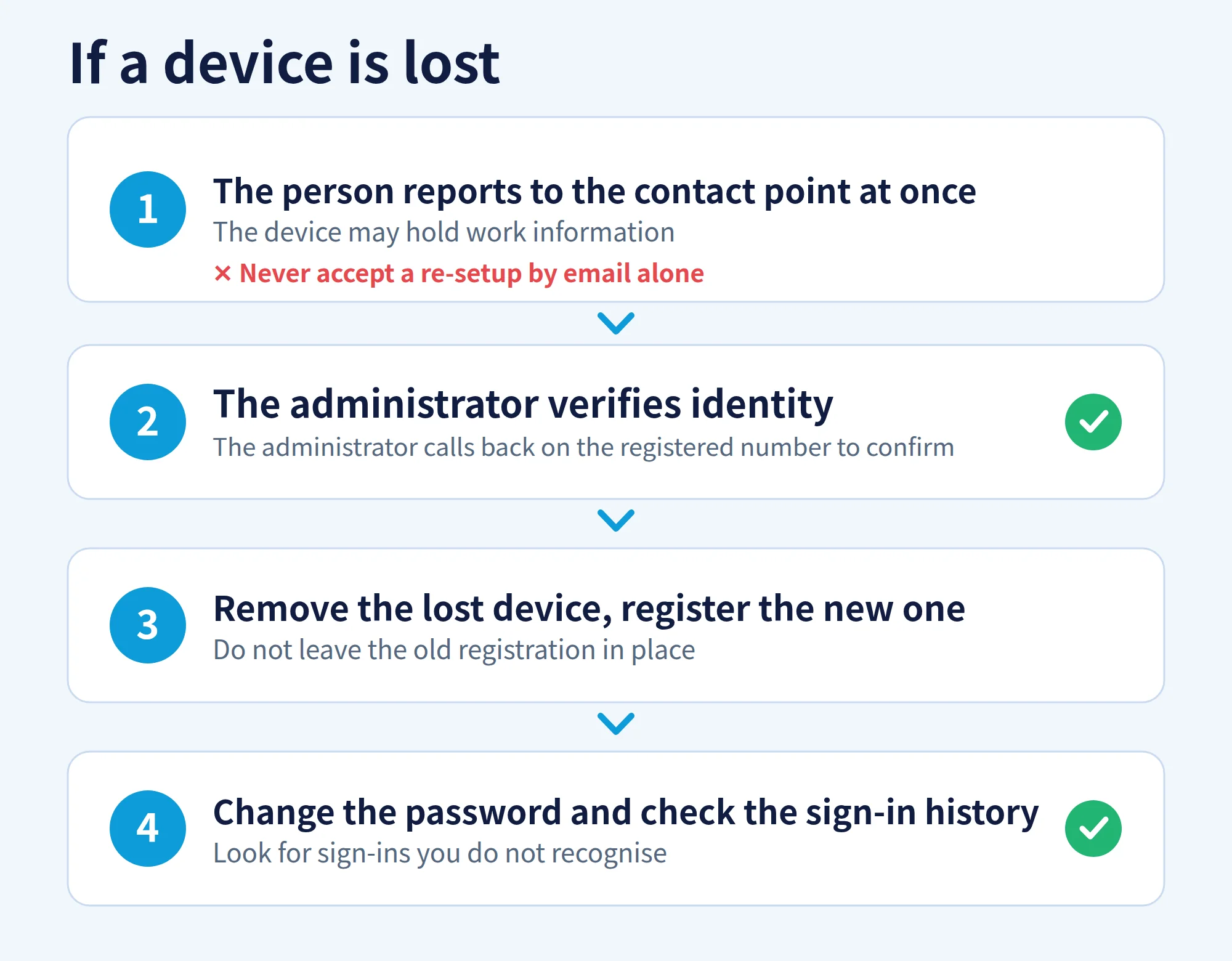
The flow when a device is lost (HIXOR's organisation; not a procedure from a public body)
- The person reports to the contact point at once. The device may hold work information.
- The administrator confirms whether it is really the person. A re-setup request may be brought by an attacker impersonating a staff member. Do not accept it by email or chat alone; the administrator calls back on the number registered inside the company to confirm. It is the same thinking as the "call-back confirmation" used when verifying a request that impersonates the president or a manager (covered in a separate article).
- Remove the registration of the lost device, and register the new device.
- Change the password, and check the sign-in records for anything you do not recognise. IPA's Top 10 Threats 2026 commentary lists, as the response when an unauthorised login has occurred, changing the password and checking that it is not reused.
If the administrator themselves loses a device. Use the emergency access administrator accounts described in the previous section, or the recovery means the service provides. After using them, record who used them, when, and why, and update the passwords and credentials. Before the New Year holidays, it is reassuring to confirm that the administrator's recovery means work.
An example one-week rollout plan
The following is HIXOR's example, assuming a small company. The number of days varies with the company's size and the number of services.
| Day | Work | Who |
|---|---|---|
| Day 1 | Inventory of accounts. List administrators, shared accounts and leavers' accounts. Decide the recovery contact point (window) | Administrator (with the owner's approval) |
| Day 2 | Set multi-factor authentication on the administrator accounts. Prepare emergency administrator accounts and backup means | Administrator |
| Day 3 | Set it on the email accounts of executives and accounting. The owner sets it up first | Administrator, executives, accounting |
| Day 4 | Explain to all staff (the reason, from when, the contact point for trouble, the contact for a lost device). Extend email to everyone | Administrator |
| Day 5 | Business-data cloud services (accounting, file sharing, chat, VPN), starting with the important ones | Administrator, each department |
| The following week on | The remaining services, exception deadlines, checks for missed settings. Periodically confirm the state of multi-factor authentication enablement | Administrator |
Rollout checklist
As you advance the rollout, confirm one by one.
- There is a list of the email, cloud services, admin consoles and VPNs in use
- Administrator accounts are kept to the minimum necessary, and separated from everyday accounts
- Multi-factor authentication is set on the administrator accounts
- The emergency administrator accounts (or recovery means) have been confirmed
- Multi-factor authentication is set on the email of executives and accounting
- Email and the business-data cloud services have been extended to everyone (or a deadline has been set)
- There is a list of shared accounts, and the user can be identified
- There is a procedure for removing the accounts and authentication registrations of leavers and transferees
- The contact point for a lost device and the identity-verification procedure have been decided and told to everyone
- Everyone has been told not to approve a notification they do not remember, and to report it
- Exceptions are recorded with a reason, a deadline and an approver
Check your own company's readiness
Your company's situation can be checked with the free security self-check tool, from 25 questions. It includes items asking about "separation of administrator accounts", "two-factor authentication (MFA)", "grasp of shared accounts" and "procedures for stopping accounts when people leave or transfer". Answers are processed only inside your browser and are not sent to a server.
If you want a third party to organise your company's current state, there is the Security Assessment (¥30,000 excl. tax; ¥33,000 incl. tax). Based on your answers to an online assessment sheet, it delivers improvement proposals with priorities attached. In the sample report (an example of a fictional company), the question "Is multi-factor authentication set even on accounts holding administrator privileges?" appears, answered "not implemented", as one of the items to advance with priority. The assessment is an organisation based on your answers; it does not include checking device settings or doing configuration work. Nor does it guarantee that no incident will occur.
Next step: start with the administrator accounts and the recovery contact point
Two things can be done today. Write down every account in the company that holds administrator privileges. And decide one contact point for when a device is lost. From there, extend to email, business cloud, and all staff.
The order in which to advance company-wide measures is summarised in Small business cybersecurity: where to start.
Check your understanding
Q1. What is the appropriate order for introducing multi-factor authentication as a company?
Answer: The order — administrator accounts → email (executives and accounting first) → cloud services holding business data → all staff and the remaining services — advances without strain. Start with what has a large impact and few people (HIXOR's organisation, based on IPA and ministry material).
Q2. There was only one administrator, and that person lost the device used for authentication. What should have been prepared?
Answer: Have two or more administrators, or prepare emergency access administrator accounts or the recovery means the service provides, and confirm periodically that they work.
Q3. A staff member contacted you: "I lost the device used for authentication, so please remove my MFA by email." May you handle it as asked?
Answer: Do not accept it by email alone. An attacker may impersonate a staff member and request a re-setup. The administrator calls back on the number registered inside the company, confirms it is the person, and only then handles it.
Review your current posture with 25 questions. Runs in your browser only.
See the latest threat intelligence