 HIXOR
Never wire money on a 'bank details changed' email — business email compromise (BEC) defences for small companies
Key points
- If an email from a supplier says 'our bank details have changed', do not reply — call the phone number you already have on file yourself, confirm the change is real, and only then send the payment (National Police Agency, IPA)
- Phone numbers and links in an email signature can be faked — use contact details obtained through a separate route: a business card, the contract, past invoices
- Never let one person complete a payment change alone — two or more people check. Leave margin in the payment schedule, so that time to check remains even when you are pressed
- If you have already sent the money, contact your bank at once and consult the police. Recovery is not guaranteed, which is why checking before you send matters
If an email arrives from a supplier saying "our bank account details have changed", do not reply to it. Call the phone number you already have on file yourself, confirm whether the change is real, and only then send the payment. This is the first defence to learn against business email compromise (BEC) — sending money to a fake account. Both the National Police Agency and IPA (the Information-technology Promotion Agency, Japan) advise confirming through contact details you already know, by a method other than email. This article explains, in order: the checking procedure, the internal rule of having two people check, three things to decide before year-end payments, and what to do if you have already sent the money.
What business email compromise (BEC) is: a fraud that impersonates a supplier to divert payments to a fake account
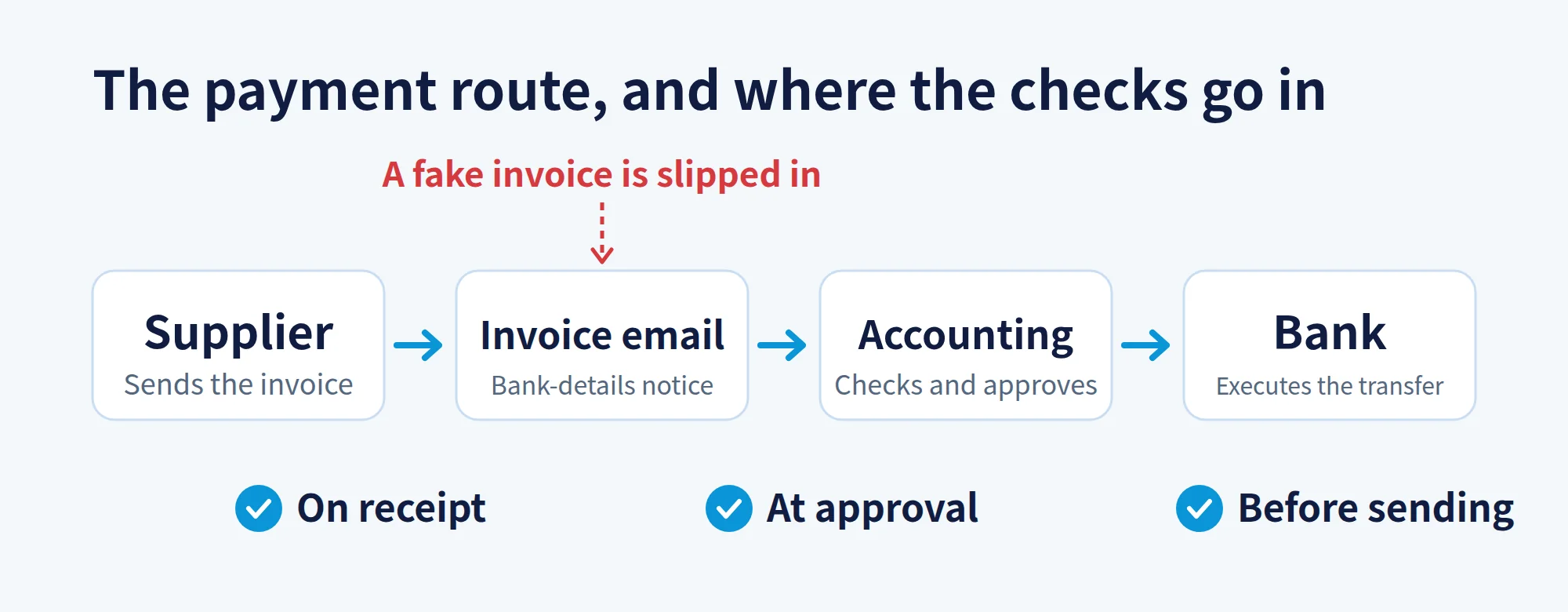
Business email compromise (BEC) is a fraud in which fake emails impersonating a supplier, or your own company's executives, trick you into transferring money to the attacker's account (National Police Agency). It does not attach viruses or lure you to a fake website; the wording looks like an ordinary business exchange, and it misleads human judgement. That makes it hard to stop with security software alone, and IPA says the first requirement is that the people handling payments know this pattern exists.
IPA divides the pattern broadly into two types. This article covers the "forged invoices from a supplier" type: impersonating a supplier and swapping the invoice or the payment details. The type that impersonates executives or managers and instructs staff inside the company to send money is covered in a separate article.
Small companies are targets too: who is targeted, and why checking is necessary
You cannot assume "we do not trade overseas, so it does not concern us". IPA reports that while many of the cases it has confirmed targeted overseas offices of Japanese companies and similar, it has also confirmed cases where companies in Japan were targeted directly, and multiple reports of money actually transferred to fake accounts ("Characteristics and Countermeasures of Business Email Compromise", 2nd edition).
On who is targeted, IPA notes that with forged invoices, both the side that pays and the side that bills can be targeted. The readers IPA has in mind are also the departments that manage money — accounting and finance — and the people who exchange invoices and payments with suppliers.
Japanese figures showing the scale and frequency of damage are limited. As a reference, a 2019 survey by JPCERT/CC (12 organisations, 117 responses, with cooperation from bodies such as the Japan Foreign Trade Council ISAC) found that cases corresponding to forged invoices were the most common, at about 75% of the total. However, that survey covered a limited set of cooperating organisations; it is not a proportion for Japanese small and medium-sized companies as a whole. In IPA's "Top 10 Information Security Threats 2026", business email compromise ranks 10th for organisations, selected for the ninth consecutive year since its first selection in 2018. IPA asks that for each selected threat, companies take countermeasures without gaps, in light of their own environment.
How "bank details changed" emails work: the sender's address alone cannot expose them
As pretexts for asking for a change of payment details, IPA has confirmed examples such as "our usual account is temporarily unavailable because of an audit" and "there was an error in the payment details, so we are sending a corrected invoice". In some cases only the account field of a genuine invoice is rewritten and sent, which makes the fake hard to spot by appearance.
The sender's address alone may not be enough to spot them. Confirmed techniques include the following.
- Using an address that closely resembles the real one. Messages may arrive from an address imitating the genuine domain name (National Police Agency). IPA has also confirmed cases where a free-mail address resembling the legitimate company's domain was obtained and used.
- The supplier's account is taken over, and the email arrives from the genuine address. IPA's commentary on the Top 10 Threats 2026 describes a case in which the account of a staff member at a US contract manufacturer was taken over, a false payment request arrived from the genuine address, and a subsidiary lost about ¥14 million (published in January 2025). In such a case, checking the address shows no difference.
- Your correspondence is read in advance. Attackers may read the transaction emails and time their message to the payment schedule. IPA alerts also confirm tricks such as impersonating both the billing side and the paying side, swapping Cc recipients for fake ones, and rewriting quoted past correspondence.
- If you ask by email, the story is patched up at once. In one case, when the payer replied that the transfer could not be made because of a problem with the account name, a different account was sent back one hour later (IPA alert, 2017). There are also cases where a fake email gives a (false) reason for a delayed payment, so that the billing side does not grow suspicious while payment is late (IPA).
For these reasons, the principle is to carry out confirmation outside email.
The checking procedure: do not reply — call the number you have on file yourself
The procedure for when an email concerning a payment arrives, following the guidance of the National Police Agency, IPA and JPCERT/CC.
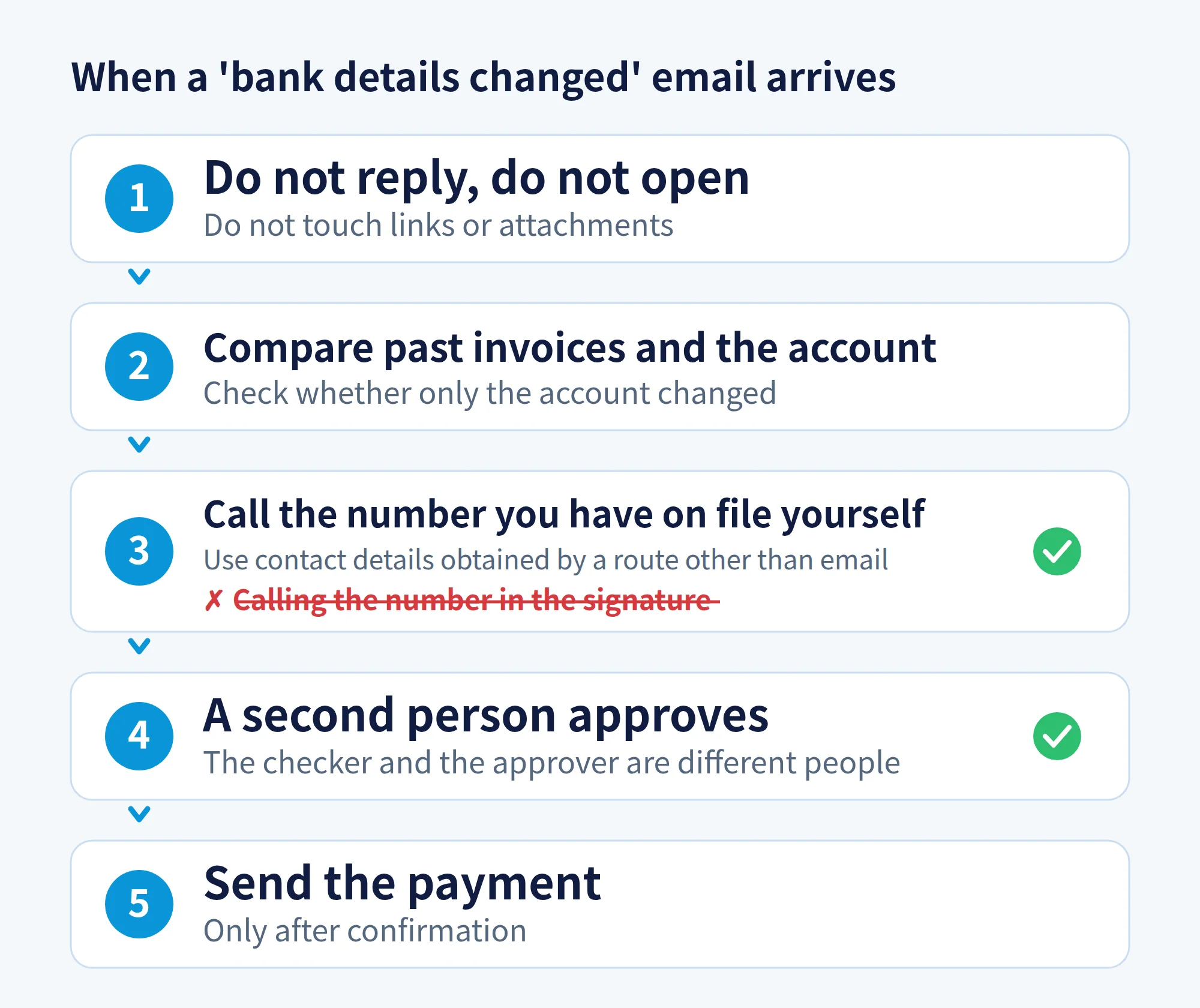
- Do not reply, and do not open links or attachments. Do not open content you were not expecting (National Police Agency).
- Compare the sender's address with past correspondence, character by character. An imitation of the genuine address is possible (National Police Agency). JPCERT/CC describes checking for differences using a check sheet that places "the content of past transactions" and "the content instructed in the email" side by side.
- Place the account in past invoices and contracts next to the account in this request. Check whether only the account has changed, and whether the reason for the change is unnatural.
- Call the phone number you have on file yourself. Use contact details obtained through a trusted route separate from email: a business card, your own address book, the contract. Do not use a number written in the email's signature — the attacker may have faked it (National Police Agency, IPA).
- Ask the person in charge directly whether the change is real. Details such as the account name of the supplier can also be confirmed with the bank the account belongs to (IPA).
- If you cannot confirm it, do not send the payment. If the call does not connect, or the person in charge does not know about the change, stop the payment until confirmation is obtained. IPA recommends confirming the facts by a means other than email before carrying out a transfer.
- The more a message presses you, the more you stop. There are patterns that demand "urgent" handling to deny you time to judge, so decide the confirmation flow in advance (IPA).
Also, in case the supplier's email account has been taken over, use a means other than email when contacting the supplier as well. For that reason, IPA recommends deciding an emergency contact route with your suppliers in advance.
Make it a company rule: never complete a change alone — two or more people check
If the procedure depends on individual care, it will be skipped on a busy day. IPA recommends establishing internal rules for wire transfers that include "confirmation by a method other than email", and building a system in which several staff members check. IPA's Top 10 Threats 2026 commentary also lists having payments reviewed and approved by multiple people, never completed on one person's judgement, and confirming requests to change an account through a pre-decided route different from the usual means of contact.
In the JPCERT/CC survey, there were also organisations that reviewed their payment flow so that, in addition to a check by the sales department, the accounting department checks as well.
For a small company, writing the following three points on a single sheet of paper is enough.
- For a change of payment details, separate the person who confirms by calling the number on file from the person who approves
- Keep a record of the confirmation (when, with whom, what was confirmed) together with the invoice
- Decide one contact point inside the company for sharing suspicious emails (IPA recommends sharing information inside and outside the organisation when something feels suspicious)
Having rules that make it easy to report when in doubt is itself one of the countermeasures.
Three things to decide before year-end payments
The year-end is a season when time tends to run short as the last working day approaches. The more you are pressed, the more confirmation is postponed, so decide the following three things before payments pile up. The thinking on order and timing here is not something public bodies have described as "increasing at year-end"; it applies points that can be read from official information to the year-end situation.
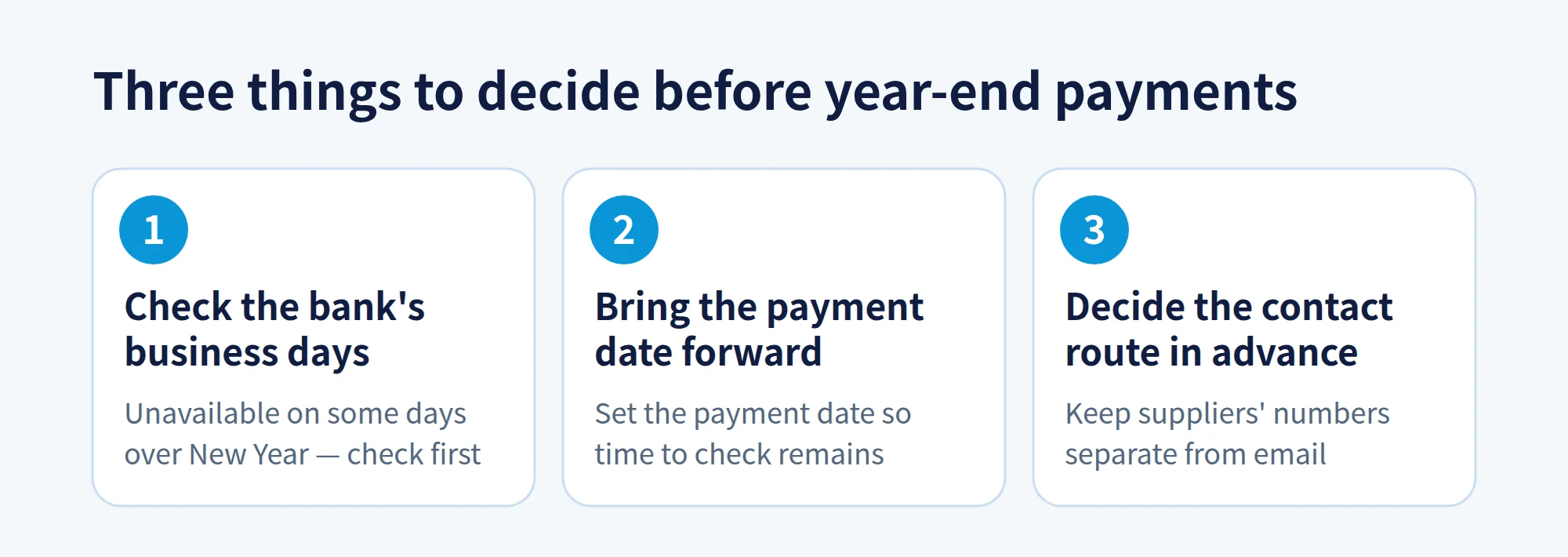
- Check your bank's reception days over the New Year period. The reception days and hours for a transfer recall (kumimodoshi — asking the bank to reverse a transfer after sending) differ by bank, and there are days over the New Year holidays when it cannot be used. To avoid panic after sending, check your bank's latest guidance in advance.
- Leave margin in the payment schedule. JPCERT/CC lists processing transfers with schedule margin as a matter of routine, and building a structure into the payment flow that allows a calm second check. An email that arrives just before the end of business hours or just before a weekend and presses for irregular handling is also listed as one of the signs of a suspicious email. If you set the flow so confirmation finishes a few days before the payment date, you keep time to check even when pressed.
- Decide an emergency contact route with your suppliers. You cannot confirm with someone whose phone number you do not know. Keep the phone numbers of the people in charge at your main suppliers noted down separately from email (IPA).
Protect your email accounts: your correspondence may already be watched
IPA states that in many cases, email is spied on before the attack. Causes given include theft of email and account information through virus infection, theft of account information through phishing, and unauthorised forwarding settings. Protecting your own company's email matters as much as the checking procedure.
- Make email account passwords hard to guess, and do not reuse them on other services
- Set up multi-factor authentication (a mechanism that adds a factor other than a password to login). The basic thinking is summarised in Getting started with multi-factor authentication. The order for introducing it as a company is summarised in Multi-factor authentication for small companies: the rollout order
- Check whether there are forwarding settings to outside addresses, or sorting rules into folders you never look at (National Police Agency, IPA)
- Keep operating systems, software and security software up to date
If you have already sent the money: bank first, then police
If you have sent money to a fake account, time matters. The guidance of the National Police Agency and IPA, in order.
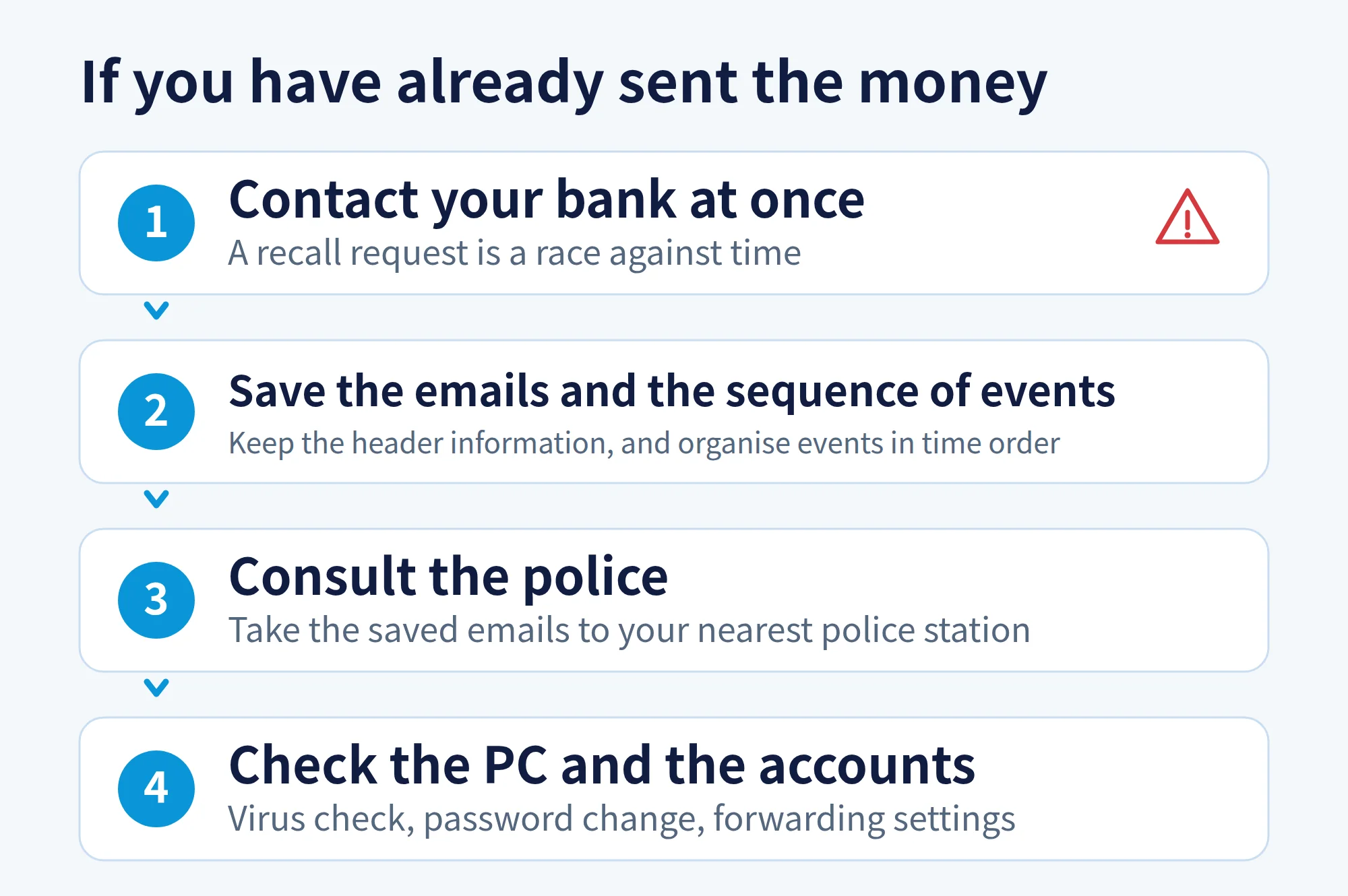
- Contact the sending bank at once and request a cancellation or recall of the transfer. However, a recall generally requires the consent of the recipient, and if consent is not obtained, the money is not returned. IPA states that among the cases it has confirmed, there are both cases where the money was recovered and cases where it was not, and that recovery is not always possible. On that basis, it advises contacting the bank you sent from immediately upon discovery.
- Save the emails and email header information received from the attacker, and organise the sequence of events in time order. The police or the bank may ask for evidence. Ask the supplier to save theirs as well.
- Report to and consult the police. Take the saved emails to your nearest police station. The National Police Agency advises that arranging the officer in charge, the date and time, and the materials to bring by phone in advance makes the procedure go more smoothly.
- Run virus checks on the PCs of the people involved, and change email account passwords. Also check whether forwarding or sorting settings have been added without authorisation.
- Contact the supplier. The attacker may also have sent email to the supplier. Because the email may have been spied on, make the contact by a means other than email (IPA).
If the destination account is overseas, IPA says it is also necessary to contact the local police in that region. The National Police Agency states that once money has been sent overseas, recovery becomes extremely difficult.
On insurance, IPA relays that amounts transferred to an attacker's account through business email compromise are often said not to be covered by cyber insurance in Japan, and advises consulting your insurance company for details.
Where to consult is organised in Who do you call after a cyber incident in Japan? It depends on the problem. If you want to read a published case, there is the JAL business email compromise case.
Pre-payment checking checklist
When you receive an email asking for an account change or an urgent transfer, check the following before sending.
- An account change, or an urgent request, arrived by email
- I have not replied to the email. I have not opened links or attachments
- I compared the sender's address with the address in past correspondence, character by character
- I placed the account in past invoices and contracts next to the account in this request
- I called the number I have on file myself — not the number in the signature — and confirmed
- I kept a record of what I confirmed, together with the invoice
- A second person in charge approved
- I checked whether it arrived just before the end of business hours or just before a weekend, with content that presses (JPCERT/CC, "knack for spotting")
- I checked whether it asks for a transfer to an account never used before (same source)
If even one item cannot be confirmed, stop the transfer and wait until confirmation is obtained.
Check your own company's readiness
Whether your company has a "payment-details change confirmation rule" can be checked with the free security self-check tool. Among its questions is an item asking whether you have a rule not to judge notices about invoices and payment-details changes by email alone, but to confirm by another means such as a phone call. Answers are processed only inside your browser and are not sent to a server.
If you want to put the rules on paper and share them inside the company, IPA publishes awareness materials (an A4 flyer and explanatory videos) that can be used. If you want teaching materials prepared as a set, the manager course in Security Training in a Box includes points to note for requests from suppliers and for approvals, and a funds-flow diagram of transfer fraud.
If you want a third party to organise your company's current state, there is the Security Assessment (¥30,000 excl. tax; ¥33,000 incl. tax). Based on your answers to an online assessment sheet, it delivers improvement proposals with priorities attached. The sample report (an example for a fictional company) carries, as an actual question, "Do you operate so that notices of a change in payment details are confirmed by another method, such as a phone call?" The assessment is an organisation of your situation based on your answers; it does not include checking device settings or doing configuration work. Nor does it guarantee that no incident will occur.
Next step: build checking time into the payment flow
Readiness against business email compromise is not special equipment; it is putting the margin of "confirming", "having two people look" and "not hurrying" into the payment flow. What you can do today: note down the phone numbers of the people in charge at your main suppliers, separately from email, and put the payment-details change confirmation rule onto a single sheet of paper.
The order in which to advance company-wide measures is summarised in Small business cybersecurity: where to start.
Check your understanding
Q1. A supplier contacts you by email: "We have changed the account for transfers." A phone number is written in the email's signature. What do you do?
Answer: Do not use the number in the signature. Call a number you obtained through a separate route — a business card, the contract, past invoices — yourself, and confirm. Do not send the payment until you can confirm.
Q2. The sender's address was the same as your usual supplier's genuine address. Can you relax?
Answer: No. If the supplier's account has been taken over, a fake email can arrive from the genuine address (IPA). Any notice that an account has changed is confirmed by phone, regardless of the address.
Q3. You realise you have sent money to a fake account. What is the first thing to do?
Answer: Contact the sending bank at once and request a cancellation or recall of the transfer. Then save the emails and consult the police.
Review your current posture with 25 questions. Runs in your browser only.
See the latest threat intelligence