 HIXOR
Suspicious email: from spotting it to reporting it — a phishing procedure for employees
Key points
- Phishing cannot be identified by appearance, so stop first and do not open it
- Check through the official app or your own bookmark; never use contact details inside the email
- Name one reporting contact, and standardise reports to five points: subject, sender, time, clicked, entered
- If you clicked or entered information, report at once; if infection is suspected, move to incident first response
The correct response to a suspicious email is three actions: do not open its links or attachments, do not use any contact details inside the email, and report it to the one person your company has named for this. With today's phishing email, you cannot reliably tell real from fake by appearance. This article gives the checking order an employee can follow on the spot, and the simple reporting procedure a small company should decide in advance.
Stop first: not opening matters more than spotting
Phishing is an attempt to steal personal information — passwords, card numbers and similar — by impersonating a real organisation (Council of Anti-Phishing Japan). Current messages are polished, with convincing wording and logos, and the sender's display name or address alone cannot establish whether a message is genuine. Even your correct name in the message is not proof that it is real.
So the behaviour to ask of employees is not "spot the fake" but "stop". If a message is unexpected, pressures you to hurry, or asks for money or a login: do not click the link, do not open the attachment, and do not try to judge it on the spot. That is the first rule. IPA's self-diagnosis reflects the same point: item 7 asks about care with email attachments and links, and item 6 asks whether suspicious information is shared inside the company.
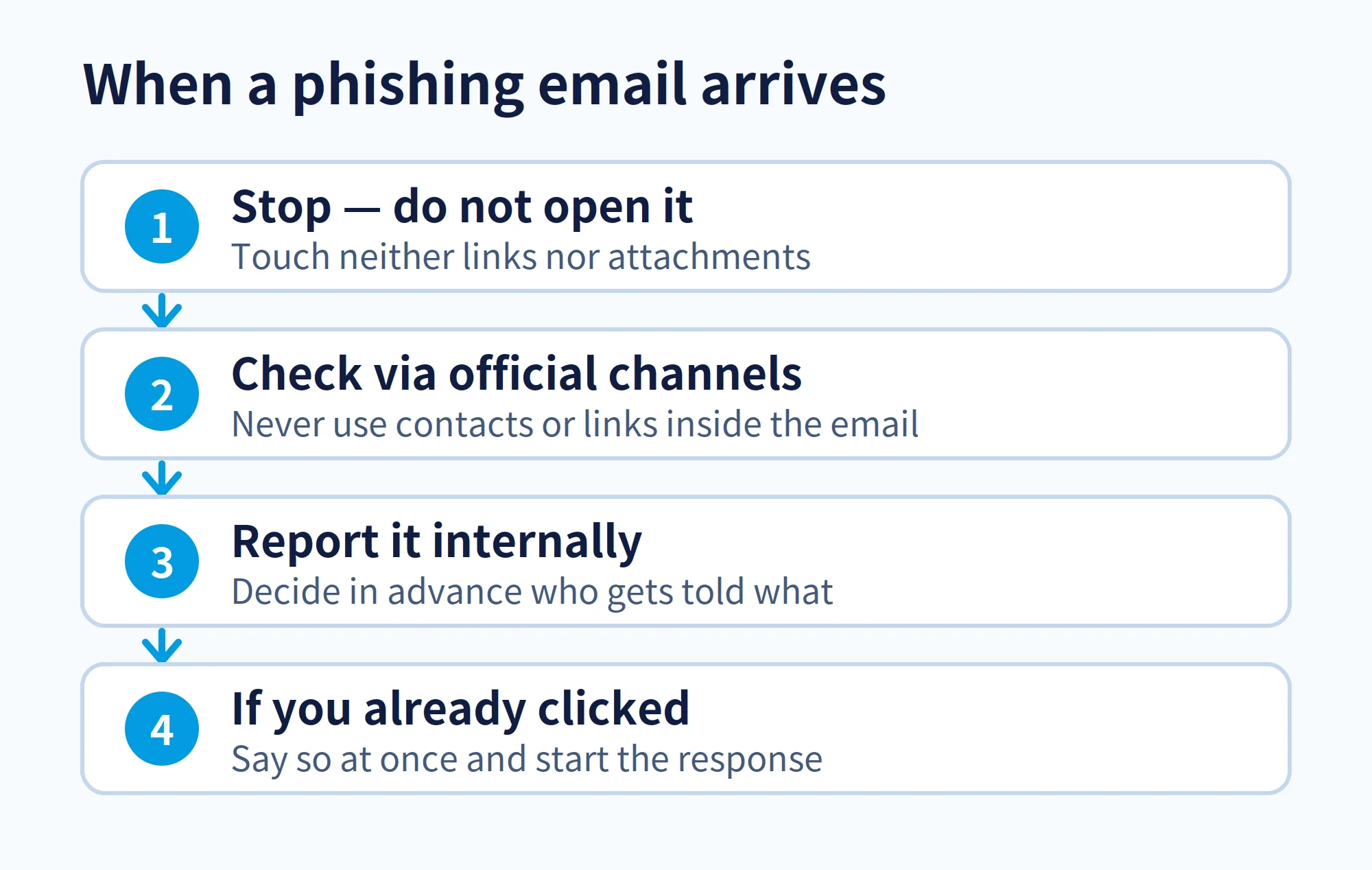
The checking order: use nothing inside the email
After stopping, check in this order. (1) Do not use the links, buttons, phone numbers or reply addresses in the message. (2) If the matter needs checking, open the official app, or the official site from your own bookmark, and check there. (3) Glance at the sender address as a hint only — it can be spoofed, so a matching address is not reassurance. (4) Do not open attachments until the sender is confirmed through a separate route. (5) Treat urgency — "today only", "your account will be suspended" — as a reason to pause, not to hurry.
The principle is to separate the check from the email. As long as you use an entrance the email itself provided, you can be led to a fake one. Entering through the official app or your own bookmark removes most of that risk. If you are still unsure, do not decide alone — move to the reporting step.
Reporting inside the company: who, what, and how
In a small company, a reporting system works best when it is simple. Decide only three things. Name one reporting contact (plus one deputy). Fix one method — forward the email as-is, or send the subject and arrival time in chat. And standardise the content of a report to five points: subject, sender, date and time received, whether you clicked anything, and whether you entered any information.
Decide in advance what the contact person does, too: check whether the same message reached other staff, warn everyone, and consider passing the information to the impersonated business or to the Council of Anti-Phishing Japan, which accepts reports of suspected phishing email and SMS (follow the Council's own guidance for how to report). Above all, management should state clearly that nobody will be blamed for reporting. In a workplace where people fear blame, the next report arrives late — and an early report is what keeps damage small for the whole company.
Deciding the procedure is not the same as being able to use it. Walking through "stop, check, report" once in training, looking at a real message together, makes the real day far less hesitant. This procedure is included in teachable slide and poster form in the Security Training in a Box kit. To start, rewrite the procedure in this article with your own reporting contact and post it where staff can see it. For the wider training picture, see where to start with cybersecurity for a small business.
If you already clicked, or entered information
How urgent this is depends on whether you only clicked, or also entered a password or card details. If you entered information, report it immediately and without hesitation — hiding it is what makes things worse. The person receiving the report can then move quickly on password changes, checking for misuse, and notifying the parties involved.
If there are warning screens or the computer is behaving strangely, that is no longer phishing handling but incident first response, which follows a different procedure. In that case, follow the first steps to take after a ransomware infection: disconnect the device from the network and contact the person your company has named. The key point is not to confuse the two stages — reporting something suspicious, and responding after something has happened — and not to carry either of them alone.
Summary: a workplace that reports is the real defence
Phishing email cannot be identified by appearance. That is exactly why the defence is a shared pattern of behaviour: do not open, do not use the contact details in the message, and report promptly to the named person. Decide the reporting contact and the five report points today, and post them in the office. The next suspicious message will be handled very differently because of it.
About the kit that teaches this procedure
Security Training in a Box ¥29,800 (tax included)
Three training slide courses (PDF + PowerPoint) that include the "stop, check, report" procedure in this article, plus a presenter script, comprehension tests and attendance record forms. Licensed for unlimited use inside your company.
Review your current posture with 25 questions. Runs in your browser only.
See the latest threat intelligence