 HIXOR
Ransomware: first steps for a small business
Key points
- First, disconnect the affected device from the network (unplug the LAN cable or turn off Wi-Fi) to stop the damage spreading
- Do not turn the power off: logs needed to investigate the cause may be lost
- Report to the person in charge, photograph the ransom screen, and record the time and every action taken in order
- Line up outside contacts early: police for a crime, the IPA for a virus report, and the Personal Information Protection Commission if personal data may have leaked
If ransomware hits, the first three steps are: (1) disconnect the affected computer or server from the network — unplug the LAN cable or turn off Wi-Fi; (2) do not switch the power off; (3) tell the person in charge and record the screen and the time. Following this order stops the damage from spreading and preserves the logs needed to investigate the cause. Answering the ransom demand and restoring data come later. Do not power the machine down or close the screen in a panic.
Signs that you may be infected
Japan's National Police Agency lists typical reports: a screen that locks up and demands cryptocurrency to "decrypt your files," or company files renamed and encrypted with a demand for payment to unlock them. The IPA's guide for small and medium enterprises also names a ransom message on screen, abnormal computer behaviour, and antivirus warnings as detection triggers. If you see any of these, do not wait for certainty — start the first steps below.
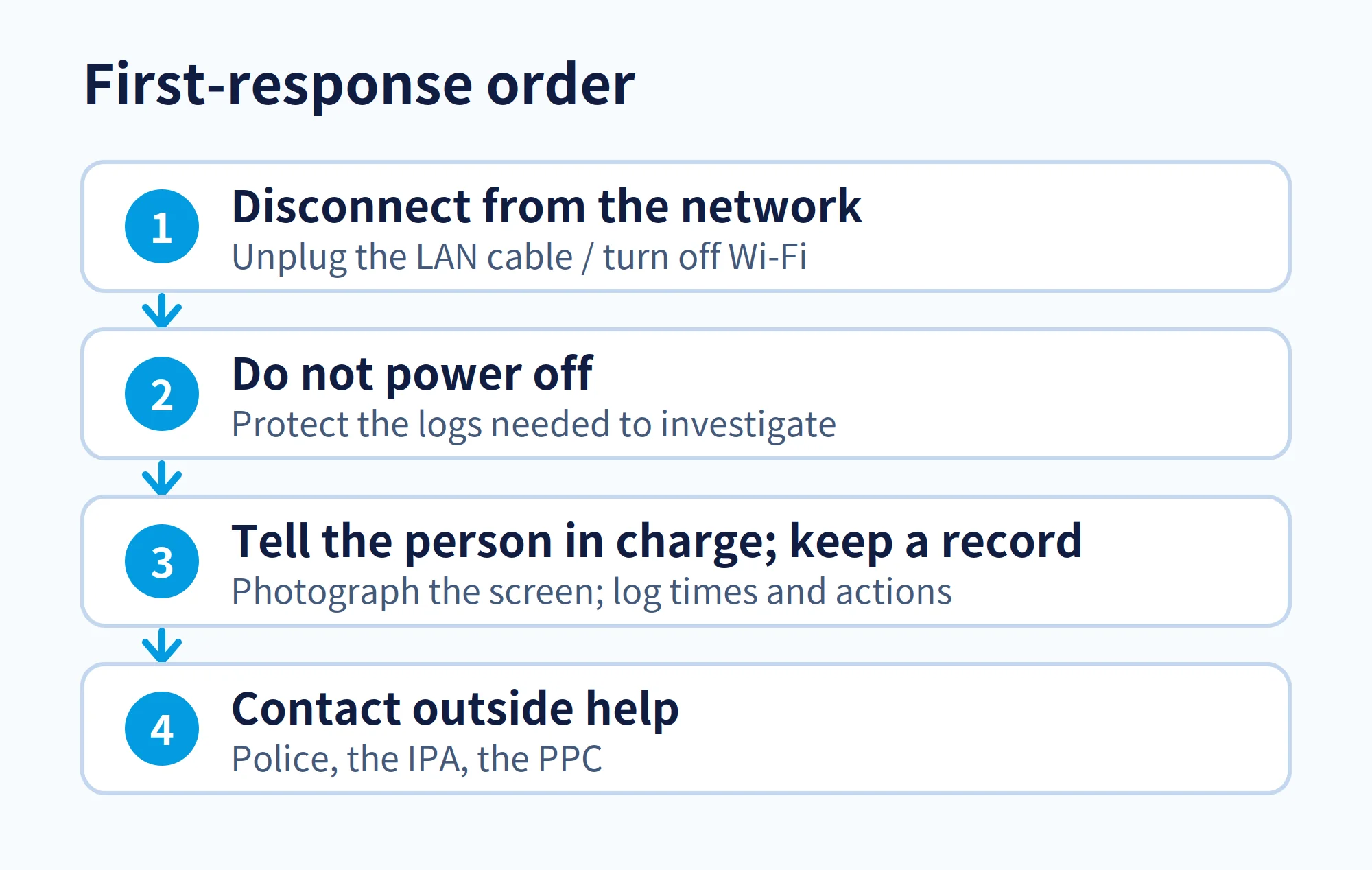
Disconnect first. Do not power off
The police guidance is direct: to prevent the damage from spreading, isolate the infected computer from the network by unplugging its LAN cable or turning off its wireless connection. At the same time, do not turn off the computer or network equipment, because logs needed to investigate the cause may be lost. Whether shared servers or other machines are also affected is checked during the investigation that follows. Stopping the spread comes first.
- Unplug the LAN cable, or turn Wi-Fi off
- Do not power off, and do not reboot
- Leave the ransom screen as it is and photograph it with a phone
- Stop working on that machine and tell colleagues not to touch it
Tell the person in charge, and keep a record
The IPA's incident response guide for small businesses starts with "detection and receiving reports": whoever finds a suspected incident reports it to the information security manager, who escalates to the business owner and sets up a response structure. In a small company, that manager may be the owner. What matters is that the person who found the problem does not keep clicking and deciding alone.
Write down the date and time of discovery, what the screen showed, how it was noticed, and every action taken, in order. The IPA guide also warns against careless operations that erase records left on the system. This record becomes the basis for consulting the police or specialists and for reporting to business partners.
Keep this order where people can read it
The hardest part of the first hour is not knowing the steps — it is having to search for them while panicking. Printed out and kept by the phone or near the server, the checklist above can be used as it is. HIXOR's Incident First-Response Cards & Runbook Pack (General Edition) organises this same sequence into role-based cards — for the discoverer, for the owner, for isolation, contacts, evidence, and external communication — so a company can walk through it once in peacetime and reduce hesitation when it matters.
Who to contact outside the company
Alongside the internal first steps, line up external contacts. The IPA guide organises the reporting stage as follows: the Personal Information Protection Commission for personal-data breaches, the police where a crime is involved, and the IPA for virus infections and unauthorised access.
- Police — Japan's National Police Agency directs victims to their nearest police station or a cybercrime consultation desk, where first-response support and information about decryption tools may be available.
- IPA — Ransomware damage is covered by the IPA's computer virus report system, which has a dedicated form for ransomware cases.
- Personal Information Protection Commission — If personal data has been, or may have been, leaked and the case falls under the reporting categories, a report to the Commission and notification of the individuals are required.
On paying the ransom, the police explain to victims that payment may fund criminal groups and that decryption is not guaranteed even if you pay. Do not decide to pay on the spot.
Investigation and recovery come after the first steps
Once isolation and reporting are under way, move to investigation. The police recommend checking all computers and servers — including those with no confirmed infection — for traces of malware or intrusion. Logs are key evidence, so store them as carefully as your backup data. If you restore from backup, remember that an always-connected backup drive may itself have been encrypted. Decryption tools from the No More Ransom project exist for some ransomware, but many types and versions are not covered.
For the full picture — incident readiness plus staff training — see small business cybersecurity: where to start. Deciding the order in peacetime, not during an incident, is the reliable way to keep the damage small.
About the printable version

Incident First-Response Cards & Runbook Pack (General Edition) — ¥19,800 (tax included)
The steps in this article, organised as six first-response cards (discoverer, owner, device isolation, contact list, evidence preservation, external communication), plus a first-response timeline, a 12-chapter policy template, a report/notification decision-flow form, two tabletop exercise scenarios, a usage guide, and a contact-list card — 7 PDFs, 23 pages, plus Word and Excel files. The article helps during an incident; the cards are printed in advance so that whoever discovers the problem can act in the same order.
Alternative (bundle): the Company Set combines this pack with the staff training kit. See the shop guide for how buying, downloading, and printing work.
Review your current posture with 25 questions. Runs in your browser only.
See the latest threat intelligence