For individuals & families
Kids' Smartphone Safety Kit
The first smartphone, on the weekend before you hand it over: setup checklists by age and by app
There is a lot to set up before handing over a phone: family sharing, Screen Time, Family Link, per-app settings, how to stop charges… None of it is hard one by one, but time passes without knowing where to start. This kit arranges the tasks in order so the “weekend before” takes half a day. It is not material for stoking anxiety — it is a calm plan for finishing the settings and the conversation.
¥1,280(tax incl.)
Buy now
Delivered by email right after payment
No account needed
Payment is handled on a secure payment page. This shop never stores your card details.
Includes free updates for 12 months from purchase.
Delivery: available immediately after payment completes (shown on the confirmation screen and sent by email). The link is valid for 7 days; expired links are re-issued free of charge.
Returns & refunds: you may cancel by email before the download is completed. Due to the nature of digital products, we cannot accept returns or refunds for change of mind after the download has completed. If a file is defective, or you cannot download it for a reason attributable to us, we will re-supply the file or refund your payment.
What you need:Everything is PDF — readable on a smartphone or computer(see “What you need” below for details)
Inside the kit
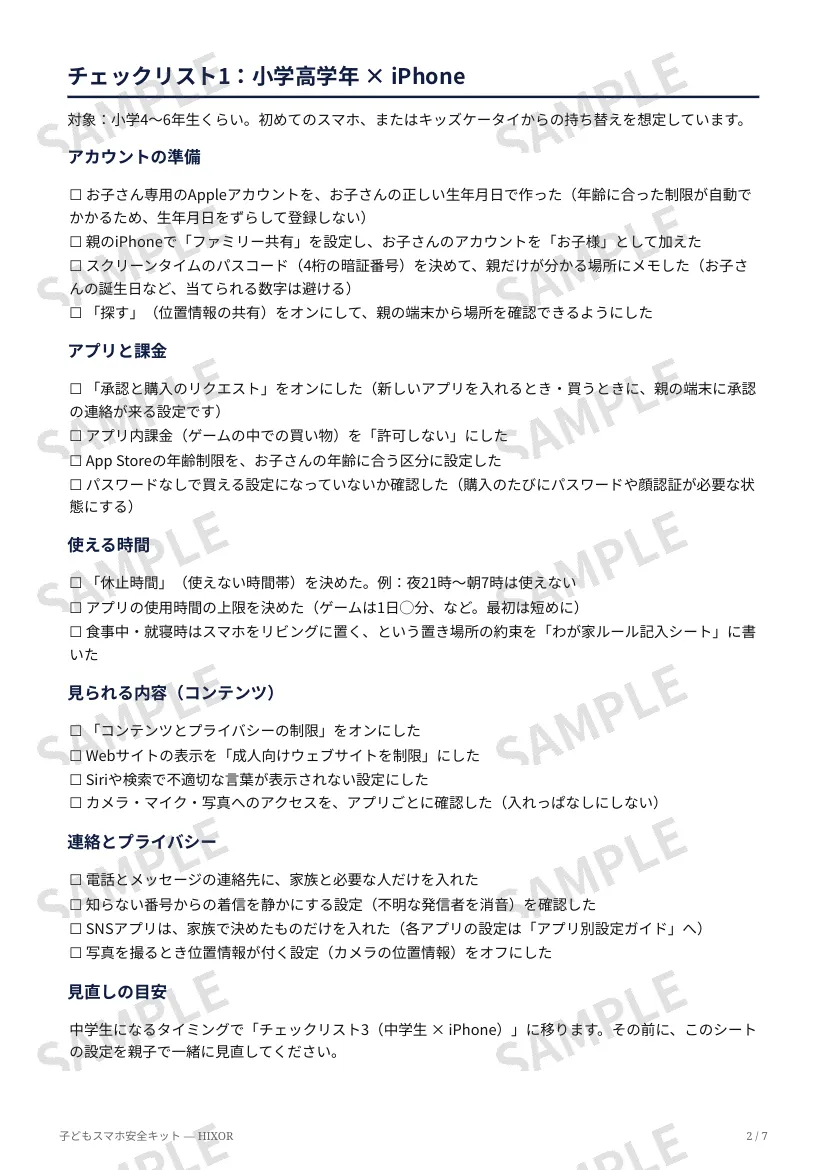
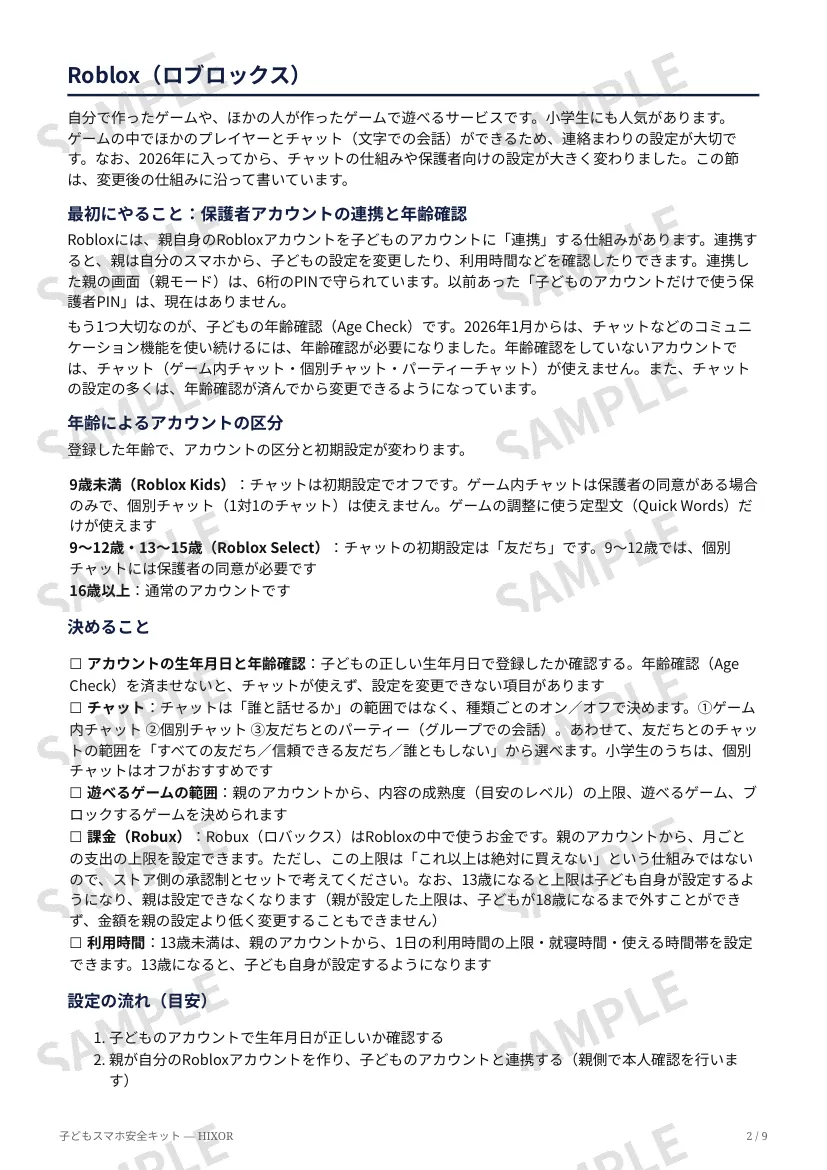
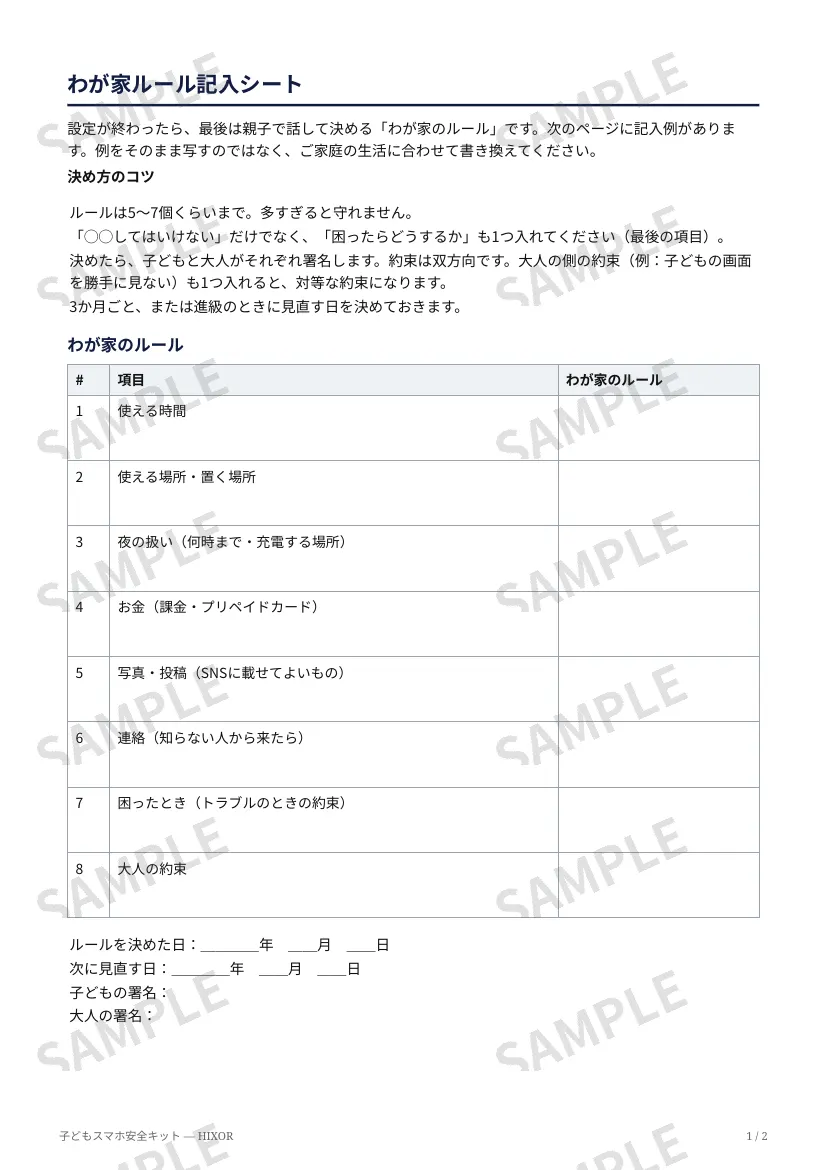
Everything in this kit is PDF: 8 PDFs, 30 pages in total. The Setup checklists (7 pages) are a 1-page how-to plus 6 sheets by age band and OS — upper elementary / junior high / high school × iPhone / Android — in checkbox style, grouped by Accounts, Charging, and Contacts. The Per-app setup guide (9 pages) covers Roblox, Fortnite, YouTube, LINE and TikTok — who your child can talk to, charging, and viewable content, per app. The Charging-prevention guide (2 pages) covers the four money entry points: store charges, carrier billing, in-game currency, and prepaid cards. The Our-family rules sheet (2 pages) is a promise sheet to print and write together as parent and child, with a filled-in example from a fictional family.
Also included: the Trouble-scenario memos (5 pages — the “first move” for 5 situations: contact from a stranger, being asked to send a photo, an accidental charge, social-media exclusion or abuse, and personal information spreading); Where to consult (2 pages — police, consumer hotline, children's helplines, organised by situation); the Bonus chapter: starting password management as a family (2 pages — how to make passphrases, plus a family account inventory sheet); and the How-to guide (1 page).
All files are PDF, readable on a smartphone or computer. Printing is on a home printer, plain A4 paper (the rules sheet is designed for printing). Use is by the purchaser and their family (same household as a guide).
In the first week — presented in the product as “the weekend before” handing over the phone — the intended use is: on Saturday, work through the settings in the order checklist → charging prevention → per-app settings; on Sunday, write the rules sheet together as parent and child; and read 2–3 age-appropriate situations from the trouble-scenario memos together.
FAQ
What file formats are included?
Everything is PDF, readable on a smartphone or computer. The rules sheet is designed to be printed and filled in by hand.
My child's age is on the border between bands (e.g. between 6th grade and junior high).
Compare both bands and choose the one that fits your family. The checklists also note when to move to the next band at school-year changes.
Will the settings make everything safe?
Settings are a starting point, not a guarantee. This kit covers both the settings and the rules you decide together as parent and child. Please use it as one layer of readiness, including the list of where to consult if trouble happens.
Will OS or app updates make it unusable?
Setting names and locations can shift slightly with updates. The checklists also explain how to find an item when it has moved. Revised editions are delivered free for 12 months from purchase.
We have already handed over a phone. Can we still use it?
Yes. The checklists also work as a check of your current settings, and the rules sheet works for a conversation after handing over, too.
Can I get a refund?
You may cancel by email before the download is completed. Due to the nature of the product, we cannot refund change-of-mind purchases after download. If a file is defective, or you cannot download it for a reason attributable to us, we will re-supply the file or refund you (see the Terms for Digital Products for details).
Can I ask questions?
Questions about the product's contents and downloading are accepted by email ([email protected]). Handling your child's individual trouble is outside the scope of this product.